Product badges, simple coupon campaigns, custom fields on checkout, a few redirects: I regularly find stores paying a yearly licence for a large plugin to do one small job. Sometimes the plugin is the right choice. Sometimes a small piece of custom code is faster, cheaper and easier to maintain.
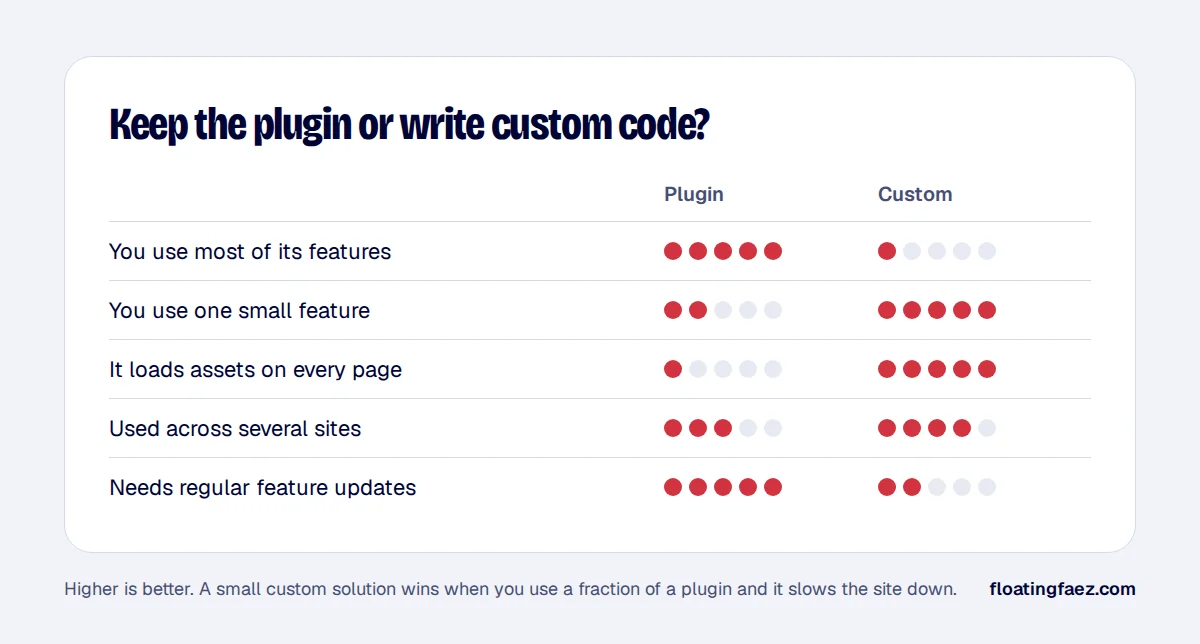
Signs a plugin should go
- You use one feature out of dozens.
- It loads CSS and JavaScript on every page, even where the feature isn’t used.
- It adds database queries or admin screens you never open.
- It conflicts with your theme or other plugins after updates.
- You pay for it on several stores, each with its own licence.
Signs you should keep it
- You use most of its features and it’s well maintained.
- It handles something complex or risky, like payments, subscriptions, security or tax.
- It gets regular updates for things that change, such as API integrations or legal requirements.
A real example: product badges
A badge plugin with its own settings pages, scripts and styles on every page can often be replaced by a small child-theme or must-use plugin function that:
- Reads a product field or tag (for example “new”, “bestseller”, “eco”).
- Outputs a small, accessible badge in the product loop and on the product page.
- Uses a few lines of CSS that load only on shop pages.
When the same store runs in several countries, the same code can be shared across all of them, with translations handled by the normal WordPress translation tools.
How to replace a plugin safely
- List exactly what the plugin does on your site, including emails, admin screens and shortcodes.
- Build the replacement on staging, as a must-use plugin or in a child theme, with version control.
- Migrate the data it stored, so existing products keep their settings.
- Compare front end, emails and checkout side by side.
- Deactivate, test, then delete the old plugin, and keep a backup.
The goal isn’t “no plugins”. It’s no plugin that costs more in speed and money than it gives back. If you’d like a plugin audit, it’s part of every speed project.