For years, “AI for WordPress” meant a chatbot that wrote blog posts. That has changed. AI coding agents in editors like VS Code can now connect to a live WordPress site and create pages, templates, global styles and components directly. I’ve rebuilt my own site this way, and it changes how I work.
The pieces
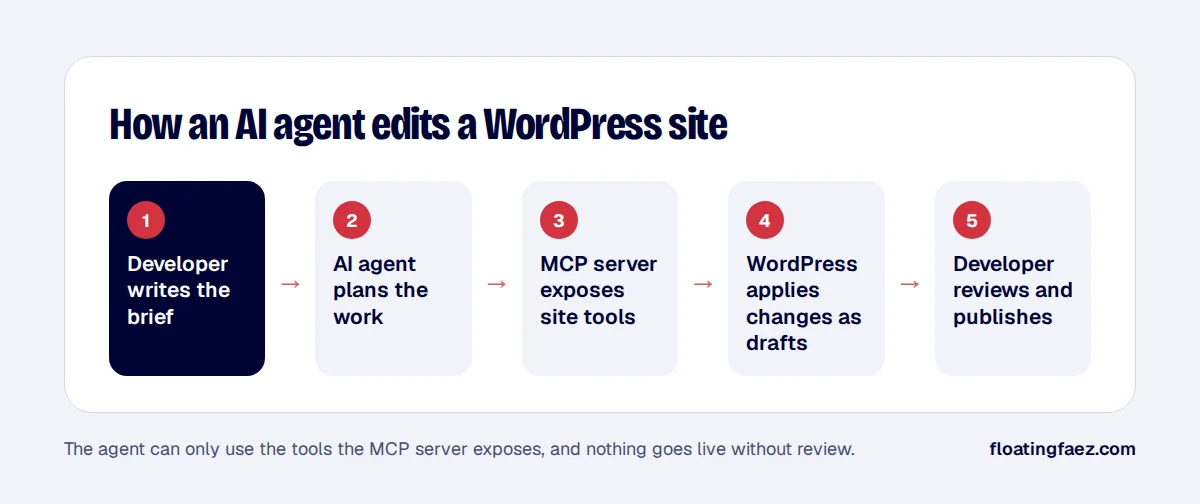
- Model Context Protocol (MCP) is an open standard that lets AI assistants use external tools in a consistent way. A site exposes tools; the agent decides when to call them.
- The WordPress Abilities API, added in WordPress 6.9, gives plugins a standard way to describe what they can do. The MCP Adapter plugin turns those abilities into MCP tools.
- Builder integrations, such as Elementor’s MCP tools, expose actions like creating pages, building layouts, managing global variables and classes, and creating Theme Builder parts.
- The agent (for example GitHub Copilot in agent mode, or Claude Code) reads your brief and files, plans, and calls the tools.
What works well
- Design systems: creating global colors, fonts and classes from a stylesheet, consistently.
- Rebuilding from a design: turning an HTML mockup into editable builder pages section by section.
- Repetitive work: creating twenty similar landing pages, or updating a component everywhere.
- Audits: reading page structures and listing what doesn’t match the design.
Where it struggles
- Visual judgement: the agent can’t always see the rendered result. Screenshots and side-by-side checks are still your job.
- Theme and plugin settings that aren’t exposed as tools, such as customizer options or caching configuration.
- Ambiguous briefs: vague prompts produce vague pages.
Guardrails I use
- A rules file in the repository, such as
.github/copilot-instructions.md, with the design system, naming rules and what the agent must never do. - Drafts only: nothing is published without review.
- Plan first: the agent shows its plan, and I approve before it builds.
- Manual approval of every tool call that writes to the site.
- Backups before every session, and a staging site for anything risky.
Is this the future of WordPress development?
It’s a big productivity gain for the repetitive 70% of a build. The remaining 30% (design decisions, debugging, performance and judgement) is where experience still matters. If you’d like a site built this way, faster but still hand-checked, let’s talk.