Your store loads quickly, but when a shopper taps “Add to cart”, nothing happens for half a second. The filter menu opens late. The size selector feels sticky. That delay is what Interaction to Next Paint (INP) measures, and since March 2024 it has been one of Google’s three Core Web Vitals, replacing First Input Delay.
What INP actually measures
INP watches every click, tap and key press during a visit and records how long it takes until the screen visibly responds. Your score is roughly the slowest of those interactions. One sluggish filter on a category page can drag the whole page down.
The old metric, FID, only measured the delay before the first interaction started being processed. INP measures the whole thing, including the time your JavaScript takes to run and the time the browser takes to paint the result. That’s why many sites that passed FID easily now fail INP.
Why WooCommerce stores struggle with INP
- Heavy themes and page builders attach many event listeners and run large scripts on every page.
- Third-party scripts like chat widgets, review apps and several pixels compete for the same main thread your buttons need.
- AJAX filters and variation swatches often re-render large parts of the page on every click.
- Long tasks: any script that runs for more than 50 ms blocks the page from responding.
The three fixes that move INP most
1. Remove or delay third-party scripts
Audit every script that isn’t essential to buying. Load chat widgets only after the visitor scrolls or clicks, and fire marketing tags on the events that need them instead of on every page load.
2. Break up long tasks
Developers can split heavy work into smaller pieces and give the browser a chance to respond between them. Modern browsers support scheduler.yield() for exactly this, with setTimeout as a fallback.
const yieldToMain = () =>
  globalThis.scheduler?.yield ? scheduler.yield() : new Promise(r => setTimeout(r, 0));

async function applyFilters(items) {
  for (const [i, item] of items.entries()) {
    renderItem(item);
    if (i % 20 === 0) await yieldToMain();
  }
}
3. Show feedback immediately
When a shopper taps a button, update the button first (a spinner, a pressed state) and do the expensive work after. The interaction is measured until the next paint, so instant visual feedback directly improves INP.
How to find your slow interactions
- Open PageSpeed Insights and check the INP value in the field data at the top. That’s real users, not a lab test.
- In Chrome DevTools, open the Performance panel, record, and click around your category and product pages. Long yellow script blocks after a click are your suspects.
- The free Web Vitals Chrome extension shows the INP of each interaction as you browse.
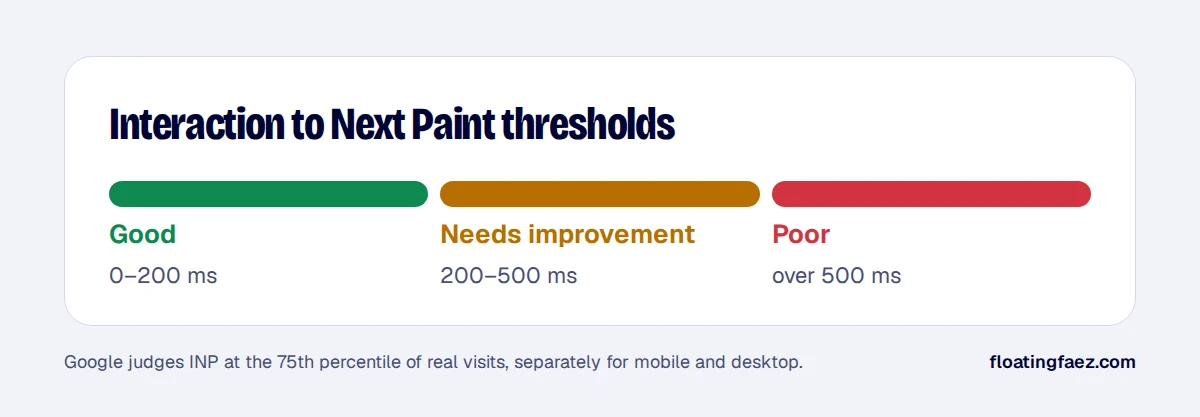
INP fixes are more surgical than image or caching fixes, but they’re what makes a store feel fast. If your field data shows INP over 200 ms, a speed audit will pinpoint exactly which scripts are responsible.