
On most product pages, images are the heaviest thing by far. Get them right and you fix a big part of your Largest Contentful Paint. Get them wrong and no caching plugin can save you.
Pick the right format
- AVIF usually gives the smallest files at the same quality. WordPress has supported AVIF uploads since version 6.5, as long as your server’s image library supports it.
- WebP is supported everywhere that matters, encodes faster and is a safe default.
- JPEG stays as a fallback for very old browsers and some email clients.
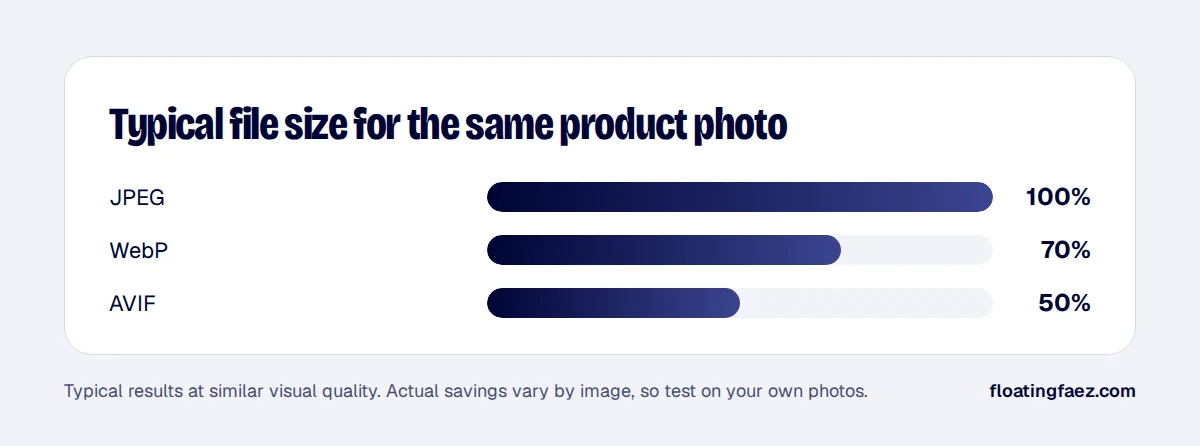
My usual setup: serve AVIF where the server can generate it, WebP as the fallback, and keep the original JPEG in the media library. Most image optimisation plugins can do this with a <picture> element or by negotiating the format with the browser.
Size images for how they’re shown
A 2400 px wide photo shown in a 400 px product card wastes most of its bytes. WordPress generates several sizes and adds srcset and sizes attributes, but themes often ask for the wrong size. Check:
- Product cards in category pages use a size close to their real display width.
- The main product image is no bigger than about twice its display width (for sharp screens).
- Gallery thumbnails don’t load the full image.
Treat the main image differently
The first product image is usually your LCP element. It should:
- Not be lazy-loaded.
- Have
fetchpriority="high". - Have width and height attributes so the layout doesn’t shift.
Every other image below the fold should be lazy-loaded.
Fix the catalogue, not just new uploads
Bulk-convert existing images in batches during quiet hours, and keep an eye on disk space: each format adds files for every size. On very large catalogues, an image CDN that converts and resizes on the fly can be simpler than storing every variant yourself.
Check the result
Run PageSpeed Insights on a category page and a product page before and after. Look at “Properly size images” and “Serve images in modern formats”, then check the LCP element is your hero image and that it loads early. Want help with a catalogue of thousands of products? That’s a typical speed project.