
If you sell made-to-measure shower enclosures, custom curtains, printed products or anything with many options, a product configurator is what turns a confusing product page into a sale. The big decision is whether to use a plugin or build it.
What a configurator needs to do
- Let the shopper choose options step by step, with only valid combinations.
- Calculate the price live as options change.
- Show a preview, either images, a drawing or a 3D view.
- Validate measurements against what can actually be produced.
- Save every choice to the order, clearly, so production gets it right.
When a plugin is enough
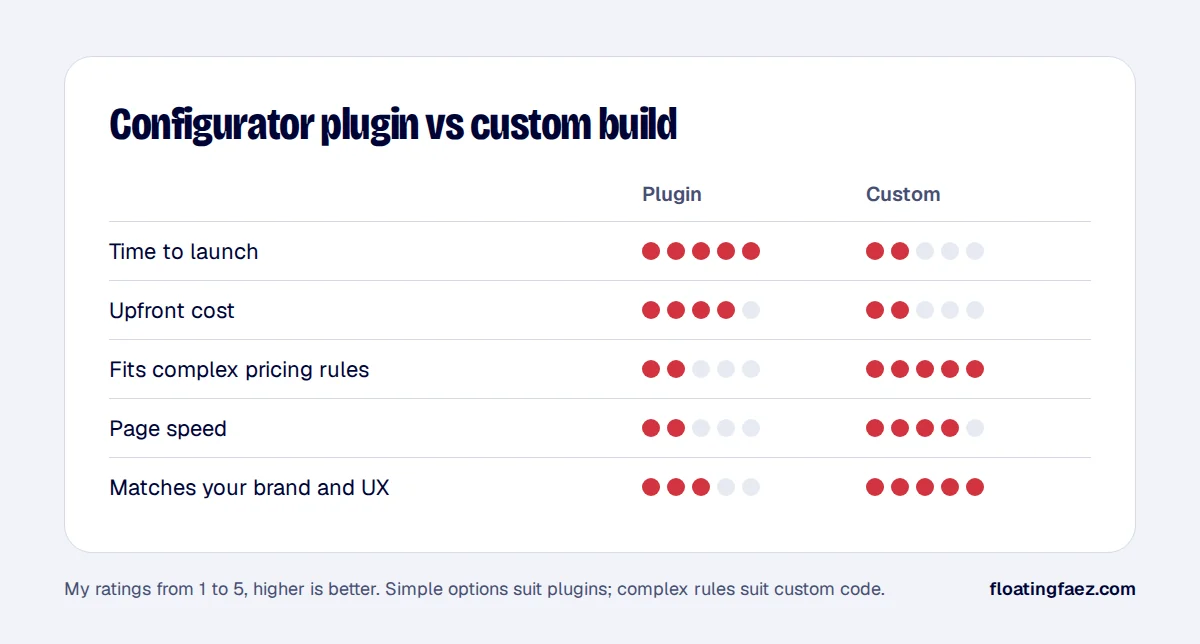
Product add-on and configurator plugins handle most stores with:
- A handful of options per product.
- Simple price additions (“+€20 for tinted glass”).
- Image swaps for previews.
They’re quick to launch and cost little. Watch out for page speed (some load heavy scripts on every page) and for how options appear in emails and order screens.
When custom code pays off
- Complex pricing: prices that depend on measurements, formulas, supplier price lists or combinations.
- Production rules: minimum and maximum sizes, incompatible options, required accessories.
- A specific experience: a configurator that matches a manufacturer’s own tool, or a visualiser that previews the result.
- Integrations: sending configurations to an ERP, a supplier or a production system.
A custom configurator is usually a small WooCommerce plugin: a front end in JavaScript or React for the steps and preview, server-side price calculation (never trust the browser’s price), and clean order item meta.
Plan these from the start
- Price on the server: recalculate on add to cart so nobody can edit the price in the browser.
- Order data: store options as readable order item meta so they print on invoices and packing slips.
- Speed: load the configurator script only on configurable products.
- Mobile: most shoppers configure on a phone, so design for small screens first.
I’ve built configurators for both simple and made-to-measure products. If you’re weighing it up, book a free call and bring your options list.